Good segments for analysis
This section presents instuctions to produce the list of good data quality segments to be used in the offline analysis.
Impatient users: directly go to Producing list of O4 good segments to produce the lists of good segments.
The official chunk definition is available here.
Analysis ready segments
First comes the selection of the segments (i.e. gps time intevals) where the interferometer (ifo) is in “observing” mode, also called DMT-ANALYSIS-READY.
Recommendation of the ifo mode to be used for offline is given in the
ObsRun4 page.
The definitions of the ifo modes are given in the
O4Flags page.
DMT-ANALYSIS-READY requires bit 0 and 1 of the GDS Calib State Vector to be on.
The definitions of these bits are given in
LIGO-T1900007.
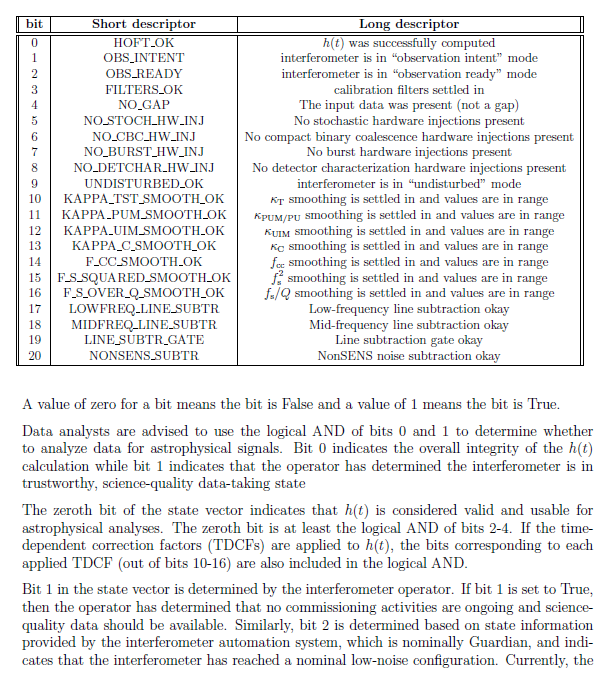
So DMT-ANALYSIS-READY is equivalent to HOFT_OK && OBS_INTENT.
To be noted: HOFT_OK requires at least OBS_READY && FILTERS_OK && NO_GAP
The DMT flags are defined in the dmt-runtime-configuration git page.
The list of segments corresponding to the different flags are stored in a database called segDB.
At least four methods can be used to query this database. Only the first one does not need a token / proxy authentification. See section on ligo.org authentification for more info on the authentification methods.
1. web interface
https://segments-web.ligo.org/
Select the interferometer, the flag, click on the right on the version of the flag (generally 1) and choose your output format.
2. ligolw_segment_query_dqsegdb
Use of Ligo lightweight (glue.ligolw) and DQsegDB (client). This method only works with X509 proxy. Scitokens is not yet supported (Issue #112).
ligolw_segment_query_dqsegdb --help

# querying ANALYSIS_READY segments of L1 in O4 chunk1
ligolw_segment_query_dqsegdb --segment-url https://segments.ligo.org --query-segments --include-segments L1:DMT-ANALYSIS_READY:1 --gps-start-time 1368975618 --gps-end-time 1370097052

ligolw_segment_query_dqsegdb -t https://segments.ligo.org -q -a L1:DMT-ANALYSIS_READY:1 -s 1368975618 -e 1370097052
The output is given in the Ligo light weight xml format. If you just want a list of start / end times of the segments, you can use ``ligolw_print ``:
3. dqsegdb2
This is a very lightweight tools with minimal dependencies. Scitokens is supported. https://dqsegdb2.readthedocs.io/en/stable/index.html
python
>>>   from dqsegdb2.query import query_segments
>>>   print(query_segments('L1:DMT-ANALYSIS_READY:1', 1368975618, 1370097052))
or
python3 -c "from dqsegdb2.query import query_segments; print(query_segments('L1:DMT-ANALYSIS_READY:1', 1368975618, 1370097052))"
4. GWpy
GWpy offers a user friendly query of dqsegdb, introducing new DataQualityFlag and DataQualityDict objects. Scitokens is supported. This is the method we will use to get good segments.
https://gwpy.github.io/docs/stable/segments/
https://github.com/gwpy/gwpy/blob/main/gwpy/segments/segments.py
CAT1
Category 1 flags are developped offline to reject additional bad data quality periods. The criteria are defined in a Veto Definer File (VDF) continuously updated during the run. (more details in T2300159-v2) and can be found in:
https://git.ligo.org/detchar/veto-definitions/-/tree/master/cbc/O4
Currently (2023/10/17), the O4 veto definer files for Burst and CBC analyses are updated with Category 1 vetoes through August 1, 2023. This corresponds to CBC chunks 1-5. The relevant veto definer release is tagged CAT1-HL-20230606-R1 and can be found here:
ligolw_segments_from_cats_dqsegdb can be used to produced the good data quality segments (ANALYSIS_READY segments and CAT1 vetoes)
in the Ligo light weight xml format, with some caveats concerning the file format as explained here.
ligolw_segments_from_cats_dqsegdb --separate-categories --individual-results --segment-url https://segments.ligo.org --veto-file H1L1-HOFT_C00_O4_CBC_unfix.xml -s 1368933107 -e 1370097052 -o cats-cbc
For our usage where only the time boundaries of good segments are needed, the next section gives a more convient way to produce the segment list.
Producing list of O4 good segments
Check you have the last version of the veto definer file for CAT1 vetoes. If not:
git clone -n git@git.ligo.org:detchar/veto-definitions.git --depth 1
cd veto-definitions
git checkout HEAD cbc/O4/H1L1-HOFT_C00_O4_CBC.xml
cp cbc/O4/H1L1-HOFT_C00_O4_CBC.xml ..
cd ..
Then, use get_good_segments.py (probably already present in your ~/virgo/prod/scripts)
Select the start and end gps times of the considered period. Then (it may take few minutes):
source /cvmfs/software.igwn.org/conda/etc/profile.d/conda.sh
conda activate igwn-py310 > /dev/null 2>&1
ecp-get-cert --identity-provider LIGO --username albert.einstein --verbose
python3 get_good_segments.py -s gps_start_time -e gps_end_time
Examples of ouput:
python3 get_good_segments.py -s 1368973312 -e 1381657488

Start time              :  1368973312.0
End time                :  1381657488.0
Total time              :    12684176.0
H1 ANALYSIS-READY       :     8748673.0 ( 68.973 %)
L1 ANALYSIS-READY       :     9796403.0 ( 77.233 %)
H1 && L1 ANALYSIS-READY :     7553591.0 ( 59.551 %)

H1 CAT1 BAD             :       15267.0 ( 0.12036257 %)
L1 CAT1 BAD             :        5396.0 ( 0.04254119 %)

H1 AR - CAT1            :     8748553.0 ( 68.972 %)
L1 AR - CAT1            :     9796403.0 ( 77.233 %)
H1 && L1 AR - CAT1      :     7553471.0 ( 59.550 %)
3 types of ascii files are produced
IFO=H1,L1 (or H1L1 for both H1 and L1 OK for analysis)
IFO_ANALYSIS_READY.txt       : DMT-ANALYSIS_READY segments from segDB
IFO_CAT1.txt                 : BAD CAT1 segments from Veto definer files
IFO_ANALYSIS_READY-CAT1.txt  : AR segments minus BAD CAT1 segments
                               ==> this is the file to be used for offline analysis
A basic check is to compare the gaps observed in h(t) data files to those returned by segdb. ffl-gap.sh and cat-gap.sh can be used.
For instance, for H1, produce the gap file for cvmfs AR frames:
ffl-gap.sh /sps/virgo/USERS/mbta/O4/HLVoffline/cvmfs/analysis-ready/H-H1_HOFT_C00.ffl > frame.gaps
and compare it to the gaps obtained from segdb (from the H1_ANALYSIS_READY.txt file, you just produced):
cat-gap.sh H1_ANALYSIS_READY.txt > segdb.gaps